|
|
你好,
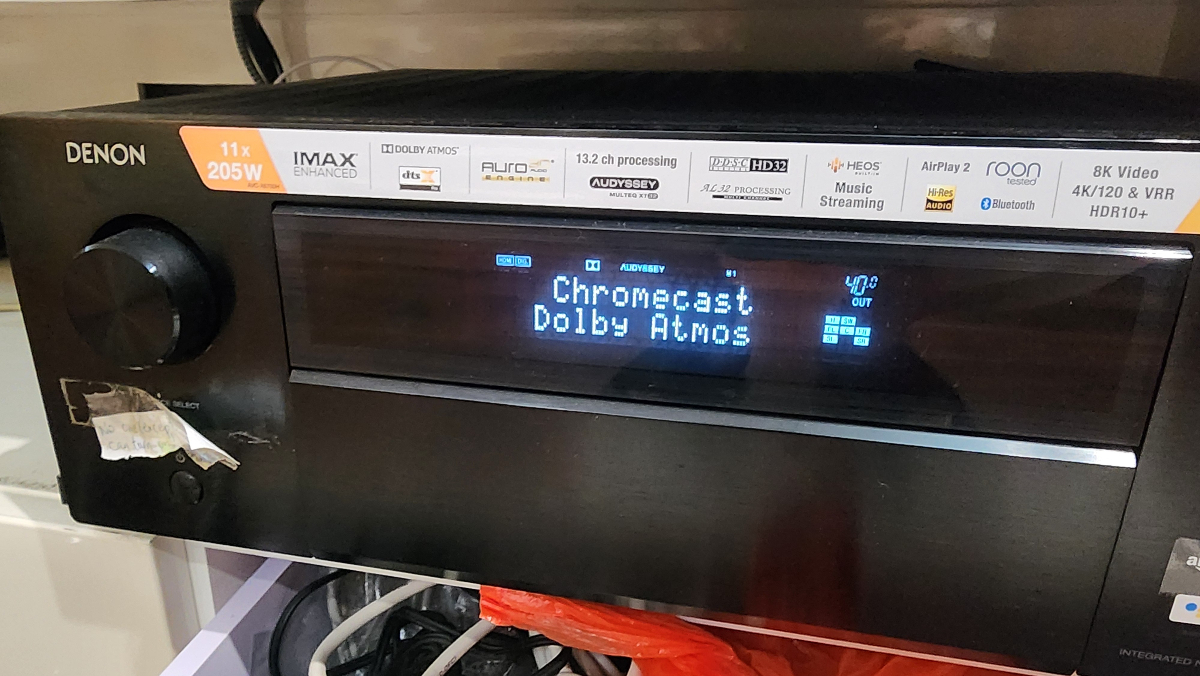
以下所有trouble-shoot 都做了, 也做了 factory reset.
仍是無聲有畫面。 所有其他功能正常, 有畫面, connect 到spotify,.....google chromecast, 等等.
用的是5.1.4 set up. setup speakers 的時候都沒有聲, cable connection 正常.
會否有chips 燒了?
救教?! 謝謝.
*******************************************************************
It is usually a settings or connection issue, not a fatal hardware fault, when a Denon AVR‑X6700H suddenly has no sound from speakers.
Below is a focused checklist tailored for the X6700H; try in order and test after each step.
Basic checks
Make sure the AVR is not muted and volume is at a normal level; also confirm “Zone2/3” are not selected or active instead of “Main”.
Verify you are on the correct input (e.g. Blu‑ray, Game, CBL/SAT) that actually has a live source sending audio.
If you use headphones, unplug them; many AVRs mute speakers when a headphone plug is detected.
Speaker and config checks
Confirm all speaker cables are firmly connected to the AVR’s binding posts and the speakers, with no loose strands shorting plus/minus.
On the AVR, go to Setup → Speakers → Manual Setup → Speaker Config and make sure each speaker you use (Front, Center, Surround, etc.) is set to “Small” or “Large”, not “None”.
Check Assign Mode (Setup → Speakers → Amp Assign) to ensure the internal amps are assigned to your main speakers and not re‑assigned to height/Zone2 in a way that leaves your main speakers unpowered.
HDMI / audio output settings
If you use HDMI to a TV, in Setup → Video → HDMI, confirm “HDMI Audio Out” is set to “AVR” (so sound goes to speakers) and not “TV”.
If you rely on ARC/eARC, temporarily set “HDMI Control (CEC)” and ARC to Off on the Denon and TV, then test again using a direct HDMI source into the AVR; CEC conflicts can force audio away from the AVR.
Try a different HDMI cable and a different HDMI input on both AVR and TV; power everything off, unplug HDMI for 30–60 seconds, reconnect, then power up TV first, then AVR, then source.
Source and audio format
On your source device (console, PC, streamer), set audio output to PCM or Bitstream and ensure it is not Dolby MAT or some unsupported format as a test.
Test with another simple source, e.g. plug a phone via analog input or Bluetooth and see if you get sound; this helps to isolate whether the issue is with HDMI or the AVR’s entire audio path.
Soft reset and power cycle
With the AVR on, hold the front panel power button for about 10 seconds to perform a soft reset, then let it reboot and re‑check sound.
Alternatively, turn the AVR off, unplug the power cord for 1–2 minutes, then plug back in and power on.
Firmware / full reset if needed
If everything above fails and the unit was working before a firmware update or randomly stopped:
Perform a full microprocessor reset (factory reset). For many Denon AVRs, this is done with a specific front‑panel button combo while powering on; refer to the X6700H manual or follow on‑screen instructions for “Initialize” to reset settings.
In some rare cases, Denon support may advise a firmware “wipe/rollback” via a button combo if they suspect a corrupted update; this has fixed “no sound from any source” for some users.
If after a factory reset and testing a known‑good analog source you still get absolutely no sound (including no test tones from the Setup → Speakers → Test Tone menu), it may indicate an internal amp or DSP fault and you should arrange service.
************************************************************************** |
|




 發表於 2026-6-14 18:08

 樓主
樓主